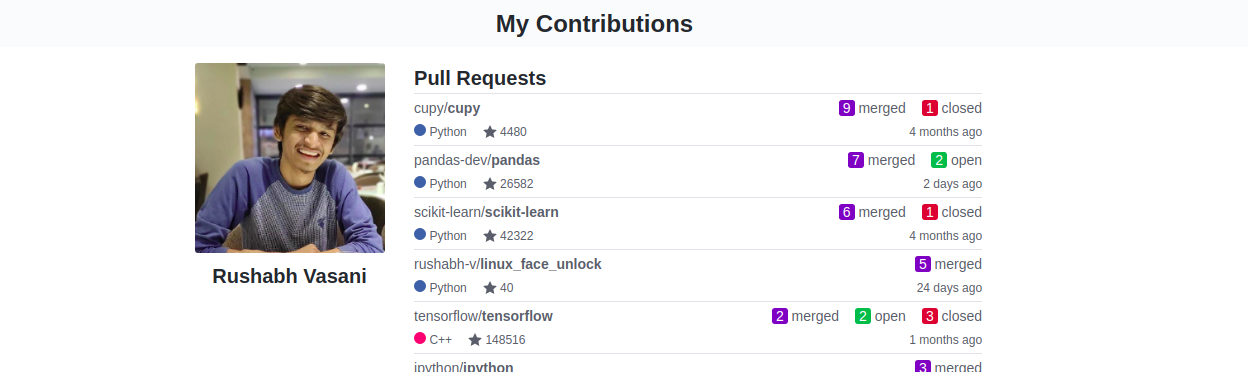
- An automated workflow that generates/updates your GitHub page (Website) and your GitHub profile readme to showcases your GitHub contributions.
- It will check your activities every day at
00:00 UTCand will automatically update thecontributrions.htmlif it finds any new Contributions.
See it working: GitHub page | GitHub profile readme
-
Generate a
Personal access tokenfromAccount settings -> Developer settings -> Personal access tokens. -
Add a secret named
GIT_TOKENhaving your thatpersonal access tokenfromrepo settings -> secrets -> new secretto the repo you want to add this workflow to. -
Go to
Actions -> New workflow -> set up a workflow yourself, paste the following code snippet there, replacePR_THRESHOLDwith your desired threshold, commit, and it will add a document namedcontributions.htmlin that repo which will automatically get updated on your new contributions (On the first occurrence of00:00 UTCafter your contribution).
- For profile readme setup, you can decide the
PR_THRESHOLD/minimum number of your PRsfor a repo to be included in your profile readme. That means you can set a number -PR_THRESHOLD, and all the repos to which you have made more thanPR_THRESHOLDnumber of PRs will be added to the list of your contributions in your profile readme. Any repo crossing the threshold will be automatically appended to your profile readme in the future.
Note: Replace<PR_THRESHOLD> on line 20 with your desired threshold to set up profile readme, Leave otherwise.
name: update-my-contributions
on:
  push:
   paths: ".github/workflows/*"
  schedule:
   - cron: "0 0 * * *"

jobs:
  main:
    runs-on: ubuntu-latest
    steps:
      - uses: actions/checkout@v1
      - uses: actions/setup-node@v1
      - name: Get Updates
        run: |
          sudo apt install python3-setuptools
          git clone https://github.com/rushabh-v/Show-Your-Contributions
          cp -r ./Show-Your-Contributions/* ./
          pip3 install pygithub
          python3 fetch_contribs.py ${{ secrets.GIT_TOKEN }}
          python3 generate_doc.py ${{ secrets.GIT_TOKEN }} <PR_THRESHOLD>
      - name: Commit
        uses: test-room-7/action-update-file@v1
        with:
          file-path: |
            contributions.html
            contributions.png
            total_contribs
            profile_readme.txt
          commit-msg: Update resources
github-token: ${{ secrets.GIT_TOKEN }}After completing the above steps, paste the following line into your profile readme and replace <username> with your username, and commit.
Or you can find your personalized line in the file named profile_readme.txt in your GitHub pages' repo.
[](https://<username>.github.io/contributions)